3 Terminal - command language interface
This chapter is based on the projectlet:
02_cli
3.1 Goals of this project
In this projectlet, consideration of debugging of practical real applications is the focus. All embedded applications need a way to communicate statuses, ability to parametrize operations and so on. During development it is critical to make it easy and convenient to add diagnostic features. A command language interface support is developed.
3.2 Essential needs
A cli support needs to be somewhat similar to a shell in a richer environment like Linux. User enters a command and the system responds with an answer. In the embedded world, the hardware support utilized is a pair of GPIO pins - one to transmit and another to receive using a simple serial interface protocol.
The adl has provided some examples of implementing such a serial interaction. For simplicity we adopt a blocking protocol for this communication. The choice of using interrupts to avoid blocking will be illustrated in a later project.
3.2.1 Incremental development
This project and other subsequent projects will also build upon the previous project the blinker to ensure the architecture being evolved is flexible.
3.3 Import of the support
The support for the basic Serial Communication is not in theory part of the adl but more of the examples component of the adl. Hence we copy the relevant code into a directory called imports thus affording us the opportunity to adapt the code to our needs. This pattern is used in other projects as a practise.
3.4 Interaction
Once the basic support for serial communication is available, the classic REPL can be implemented:
File : cli.adb

0014 |
0015 | with terminal;                           -- fundamental operations are abstracted in this package
0016 |
0017 | procedure cli is
0018 | begin
0019 |    loop
0020 |       declare
0021 |          Req : String := terminal.Receive;
0022 |       begin
0023 |          cmd.Execute( Req );
0024 |       end ;
0025 |    end loop ;
In its essence the system needs a way to send output to the user and another to accept a command. In this implemenation, it is fully simplex - no parallel transmissions - supported using the interface spec :
File : terminal.ads

0005 |    function  Receive return String ;
0006 |    procedure Send (This : String);
The user entered line is analyzed and dispatched to an implementing function as follows:
File : cmd.adb

0073 |       if cmdline( strfrom .. strto ) = "help" then
0074 |          Help ;
0075 |          return ;
0076 |       elsif cmdline( strfrom .. strto ) = "version" then
0077 |          Version ;
0078 |          return ;
0079 |       elsif cmdline( strfrom .. strto ) = "random" then
0080 |          Random ;
0081 |          return ;
An example command random may be implemented as:
File : cmd.adb

0115 |    procedure Random is
0116 |    begin
0117 |       New_Line ;
0118 |       terminal.Send("Next : " ) ;
0119 |       terminal.Send( support.rng.Random'Image ) ;
0120 |       New_Line ;
0121 |    end Random ;
As shown above, the actual random number generation utilizes the hardware random number generator provided by the STM32 as indicated:
File : support-rng.adb

0004 |    function Random return Interfaces.Unsigned_32 is
0005 |    begin
0006 |       return Interfaces.Unsigned_32(STM32.RNG.Interrupts.Random) ;
0007 |    end Random ;
Slightly more involved might be multiword commands eg. :
File : cmd.adb

0128 |       Split ( cmdline , work , strfrom , strto ) ;
0129 |       if strfrom > cmdline'last
0130 |       then
0131 |          New_Line ;
0132 |          terminal.Send("which LED?");
0133 |          New_Line ;
0134 |          return ;
0135 |       end if ;
0136 |
0137 |       if cmdline( strfrom .. strto ) = "blue" then
0138 |          stm32.GPIO.Toggle( BLUE_LED ) ;
0139 |       elsif cmdline( strfrom .. strto ) = "red" then
0140 |          stm32.GPIO.Toggle( RED_LED ) ;
0141 |       elsif cmdline( strfrom .. strto ) = "green" then
0142 |          stm32.GPIO.Toggle( GREEN_LED ) ;
0143 |       elsif cmdline( strfrom .. strto ) = "orange" then
0144 |          stm32.GPIO.Toggle( orange_LED ) ;
0145 |       elsif cmdline( strfrom .. strto ) = "ext" then
0146 |          stm32.GPIO.Toggle( support.led.status_led ) ;
To summarize, a REPL module can be added to the application and will be extremely useful as a diagnostic tool during development. It is not anticipated that such support will be released to production - except with extreme precautions.
This implementation suffers from the limitation that it is “simplex” in that the primary logic is single threaded and when the system is awaiting user input, no other operations can go on. In later improvements this restriction will be lifted.
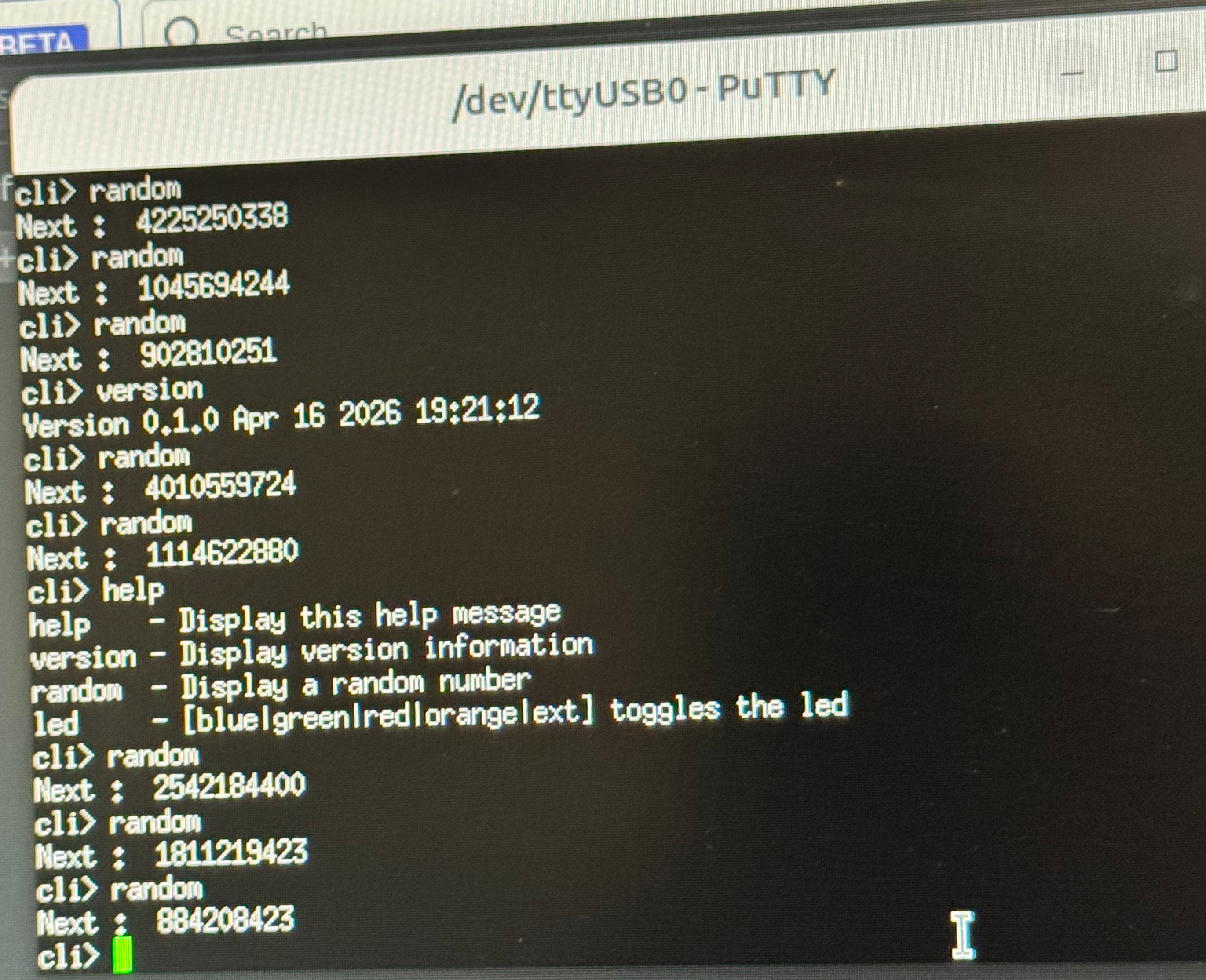
Following is an example of an interactive session with the cli:
3.5 Serial communication using GPIO pins
The serial communication channel is specified with a number of parameters. Thereafter they can be configured as needed:
File : serial_io.ads

0040 |    type Peripheral_Descriptor is record
0041 |       Transceiver    : not null access USART;
0042 |       Transceiver_AF : GPIO_Alternate_Function;
0043 |       Tx_Pin         : GPIO_Point;
0044 |       Rx_Pin         : GPIO_Point;
0045 |    end record;
0046 |
0047 |    -- Configuration for the Serial port
0048 |    -- Typical - 115200 baud, 8 data bits, no parity, 1 stop bit, no flow control
0049 |     procedure Configure
0050 |      (Device    : access USART;
0051 |       Baud_Rate : Baud_Rates;
0052 |       Parity    : Parities     := No_Parity;
0053 |       Data_Bits : Word_Lengths := Word_Length_8;
0054 |       End_Bits  : Stop_Bits    := Stopbits_1;
0055 |       Control   : Flow_Control := No_Flow_Control);
0056 |
The specifications are very similar for most microcontrollers though some may require additional specifications or may be simpler. This arises out of the convenience that most GPIO pins can be applied for different functions depending on the peripheral device attached. A GPIO pin may be TX for one setup but independently may serve as a member of an I2C bus in another. In this project the specifications are:
File : peripherals_blocking.ads

0041 |    --  the USART selection is arbitrary but the AF number and the pins must
0042 |    --  be those required by that USART
0043 |    Peripheral : constant Serial_IO.Peripheral_Descriptor :=
0044 |                   (Transceiver    => USART_1'Access,
0045 |                    Transceiver_AF => GPIO_AF_USART1_7,
0046 |                    Tx_Pin         => PB6,
0047 |                    Rx_Pin         => PB7);
0048 |
0049 |    COM : Blocking.Serial_Port (Peripheral.Transceiver);
3.5.1 USART interactions
Since the communication is designed to be Simplex the state of the peripheral should be monitored to know when the transmitter or the receiver is idle so the next step can be performed. The monitoring of the peripheral is achieved thus:
File : serial_io-blocking.adb

0066 |    procedure Await_Send_Ready (This : access USART) is
0067 |    begin
0068 |       loop
0069 |          exit when This.Tx_Ready;
0070 |       end loop;
0071 |    end Await_Send_Ready;
0072 |
0073 |    procedure Await_Data_Available (This : access USART) is
0074 |    begin
0075 |       loop
0076 |          exit when This.Rx_Ready;
0077 |       end loop;
0078 |    end Await_Data_Available;
The state of the peripheral USART is utilized in achieving transmission and reception of data:
File : serial_io-blocking.adb

0037 |    procedure Send (This : in out Serial_Port;  Msg : not null access Message) is
0038 |    begin
0039 |       for Next in 1 .. Msg.Length loop
0040 |          Await_Send_Ready (This.Device);
0041 |          This.Device.Transmit
0042 |            (Character'Pos (Msg.Content_At (Next)));
0043 |       end loop;
0044 |    end Send;
0045 |
0046 |    procedure Receive (This : in out Serial_Port;  Msg : not null access Message) is
0047 |       Received_Char : Character;
0048 |       Raw           : HAL.UInt9;
0049 |    begin
0050 |       Msg.Clear;
0051 |       Receiving : for K in 1 .. Msg.Physical_Size loop
0052 |          Await_Data_Available (This.Device);
0053 |          This.Device.Receive (Raw);
0054 |          Received_Char := Character'Val (Raw);
0055 |          Await_Send_Ready (This.Device);
0056 |          This.Device.Transmit
0057 |            (Character'Pos (Received_Char));
0058 |          exit Receiving when Received_Char = Msg.Terminator;
0059 |          Msg.Append (Received_Char);
0060 |       end loop Receiving;
0061 |    end Receive;